venmo budget tracker
explored how a built-in budget tracker within the venmo app could make money management easier and more approachable.
the inspiration
$5 for an iced coffee, $10 for the movies, $3 for pizza. like many others, i'm constantly sending a venmo to someone for something. but when i switch apps to check my bank account, i never realize how much all these small charges add up, and how quickly they make a big difference. this inspired me to create a feature that allows venmo to be more than just a way to send or receive money, but also a tool to efficiently manage it.
economically conscious individuals want an easier way to manage their money so they can improve their spending habits.
venmo can increase their company revenue by providing customers with a feature that helps improve customer satisfaction and is not available on their competitor's applications like zelle and paypal.

user research
i then spoke with 13 individuals about how they use venmo and their spending habits. this wide range of responses helped me identify key pain points and motivations when it comes to managing money.
use the venmo app at least once a week
felt like it was easy to overspend
have a budget currently
expressed interest in using a budget tracker to track expenses
these interviews helped show me that many college students struggle with overspending, even when they have a budget in place. when i asked how they keep other aspects of their life organized, they shared that they had clear systems that made them feel more efficient and less stressed. however, none of them used a budget tracker, despite expressing concerns about spending.
additionally, every interviewee used the venmo app, and the overwhelming majority used it on a weekly basis. this suggests that venmo would be an ideal platform to enhance with a new feature, since it's already widely adopted. adding a budget tracker to venmo increases the app's value by turning it into not just a payment platform, but a money management tool.
i also learned that most participants believed a budget tracker could help their spending, but they felt that creating one themselves would be too overwhelming or time-consuming. by embedding a tracker directly into venmo, users could access a personalized budgeting tool without the stress or hassle of starting from scratch.
after identifying this potential feature, i wanted to figure out how to design it in a way that would truly meet user needs. to guide this, i created an empathy map based on the qualitative insights from my interviews.
empathy map
click each section to explore what users said, thought, did, and felt
from speaking with users, i learned that there is a strong need for a simple, efficient way to manage money. this need could be addressed by adding a budget tracker feature to the venmo app.
competitive analysis
before sketching my wireframes, i conducted a competitive analysis on other budget trackers to gather inspiration and better understand how people typically structure their budgets. i focused on two main competitors: the pocketguard app and excel spreadsheet templates.
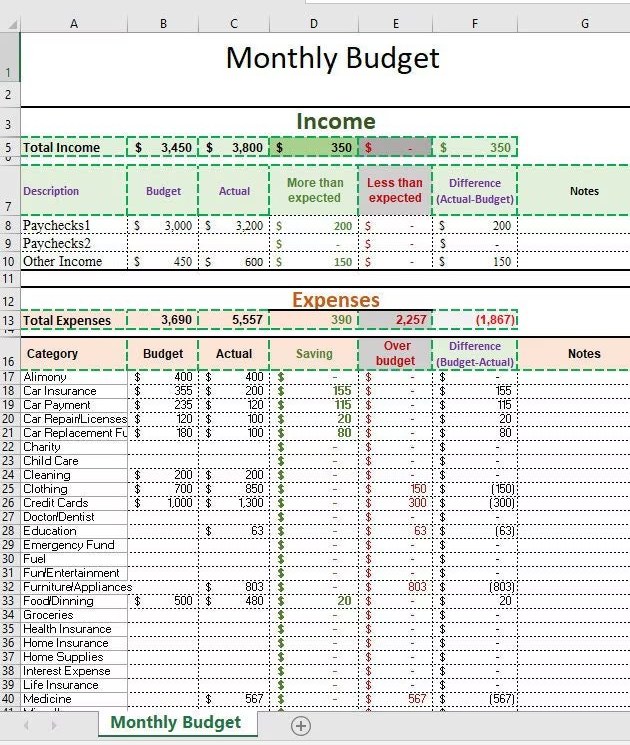
an excel template
pros
- easy to customize
- unlimited personalization
cons
- not visually appealing
- lack of graphs to keep track of progress
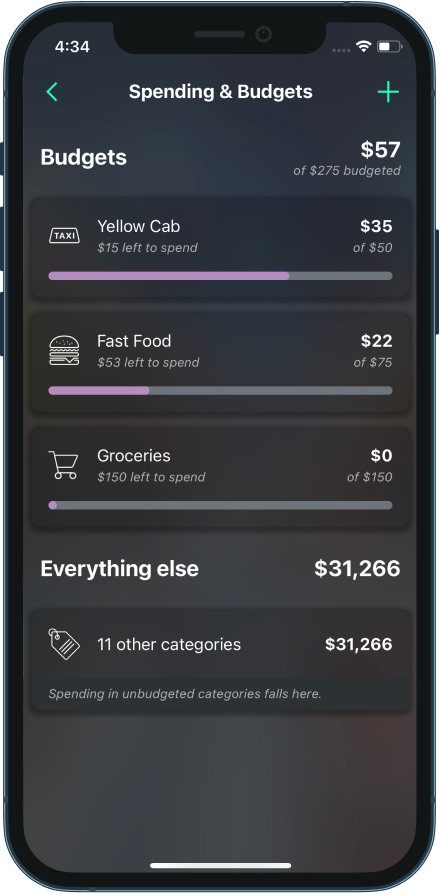
the pocketguard app
pros
- easy to organize
- displays exactly how much budgeted money a user has
cons
- goals are difficult to find on the app
- many features require payment
user goals + flows
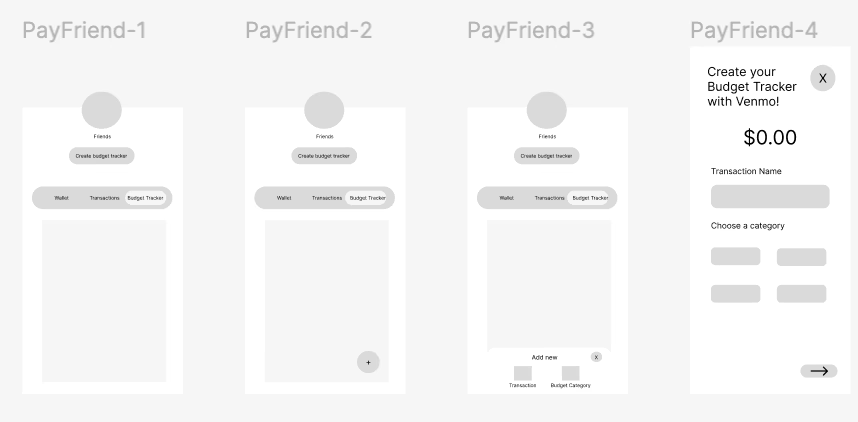
after researching, i identified three main goals that a user would have when using the budget tracker. i then created task flows to reflect these goals and guide the user experience, which later informed the structure of my wireframes.
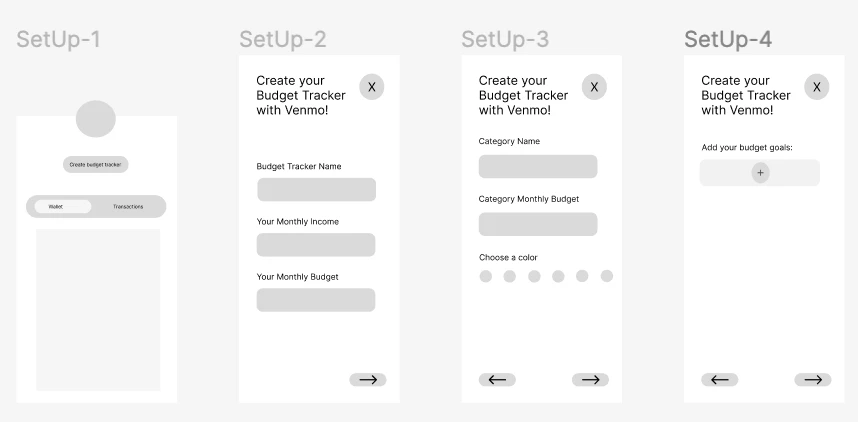
set up the budget tracker on venmo
create a sign-up process that includes basic budget information, categories, and goals. this allows users to personalize the tracker to their needs, giving them autonomy to make it as simple or detailed as they'd like without feeling overwhelmed during setup.
create budget tracker
add budget details
create budget categories
add budget goals
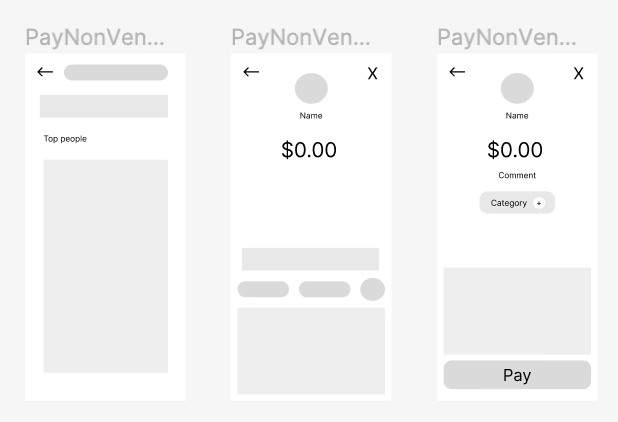
add venmo transactions to the budget tracker
integrate the budget tracker into the traditional venmo payment flow so users don't have to navigate through multiple screens. this makes it easier to remember to log transactions because it's built into a process they're already familiar with.
find venmo friend
add payment amount
add budget category
add non-venmo transactions to the budget tracker
include an option for users to manually add cash or credit card payments. in interviews, users emphasized how much they value organization, so including non-venmo transactions helps them track all payments in one place and stay more organized.
go to budget tracker
click add symbol
add new transaction
add payment details
design choices
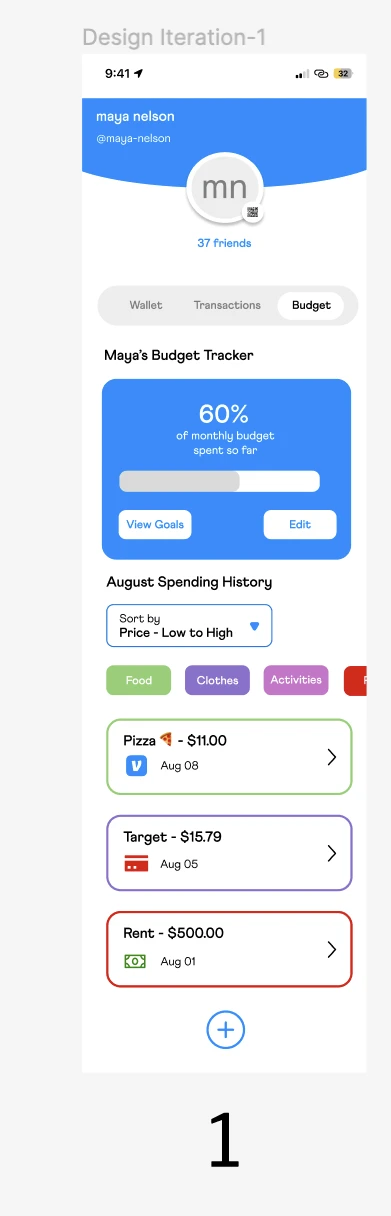
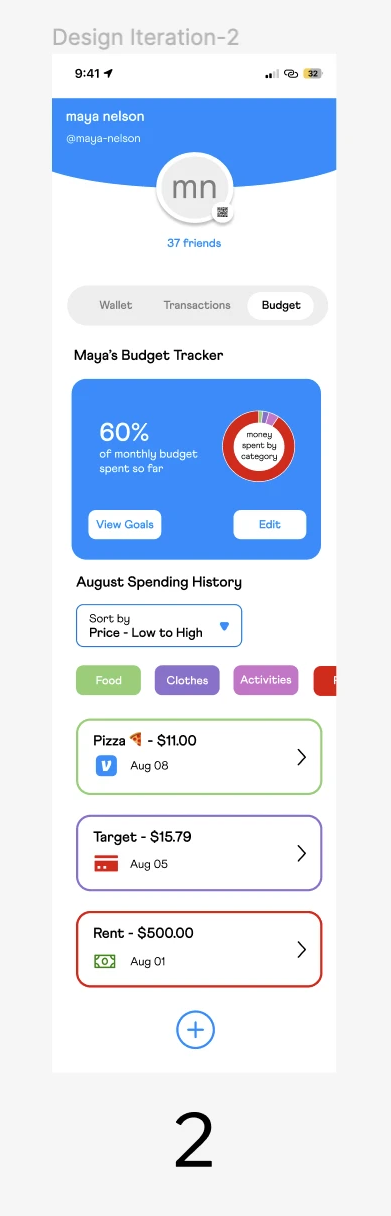
after wireframing based on my task flows, i moved on to high-fidelity prototyping. while working on my high-fidelity prototypes, i created three iterations of the home screen, as shown below. hover over each screen for what i liked and didn't about it.
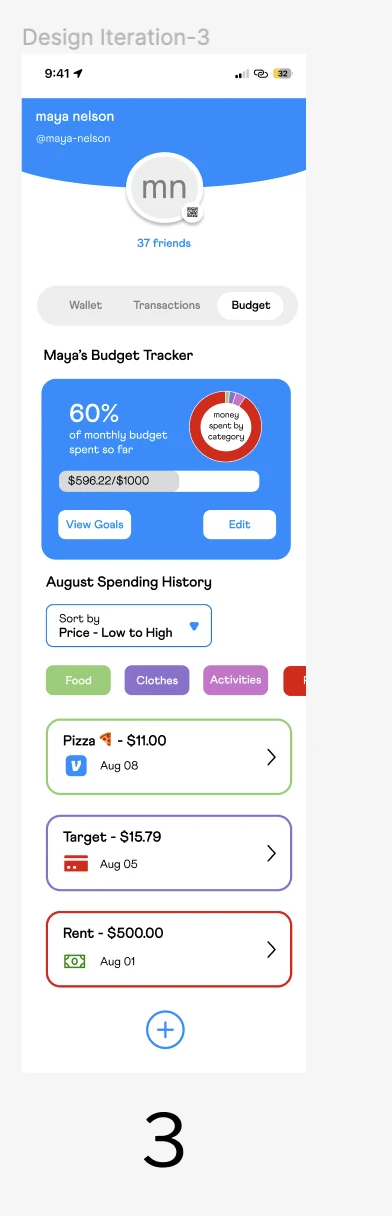
ultimately, i chose iteration 3 because the specificity of the data provided the most value to users. they were able to gain detailed insights into their spending and track their current progress, which helped them identify opportunities to be more financially responsible.
i also ended up creating iterations for the transaction widget that showed up on the homepage for the budget tracker. hover over each for what i liked and didn't about it.
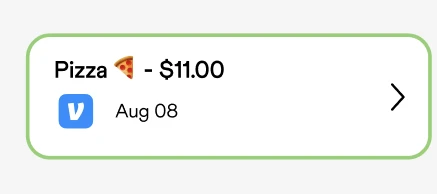
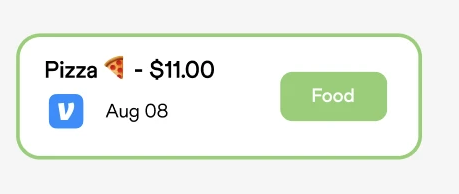
i decided on iteration 2 because it reduced the need for users to actively recall which category a purchase belonged to. this design made it easier for users to recognize and identify the budget category that corresponded with each transaction.
the final product
behind my design decisions
- prioritized metrics to make the app more useful and informative
- included detailed transaction information to give users a clear picture of their spending
- built in customization so users could personalize the budget tracker to fit their needs
i've included key features of my high-fidelity prototype below, or you can view the full figma prototype.
reflection
it was really cool designing a feature that i could see myself using almost daily. this made the project a lot of fun to complete, and i learned so much along the way.
try new things
for this case study, i pushed myself to try new techniques and expand my skillset. this helped me better understand users, improve my research and design abilities, and reminded me to embrace ambiguity throughout the process.
create with a purpose
while working on this feature, i made a point to reflect on why i was designing things a certain way. i leaned heavily on user research to inform my decisions and stayed focused on building something that would genuinely help users.
have actual conversations with users
it's easy to fall into the trap of designing for yourself, but this project reminded me of the power of talking to real users. the insights they shared shaped the direction of this feature and helped me identify a real user need, while also offering venmo a strategic opportunity to stand out from competitors.